How to Check Average FPS of a Steam Game on Steam Deck
Steam now tracks how well games actually run on Steam Deck. On SteamScore you can see the average FPS for both Steam Deck LCD and Steam Deck OLED right on every game page, without digging through forums or YouTube benchmarks.
Updated
Quick answer
Open any game on SteamScore, scroll to the Steam Deck support card and read the Avg FPS line at the bottom. It shows the average frame rate players get on Steam Deck LCD and Steam Deck OLED, based on real play sessions from the last month.
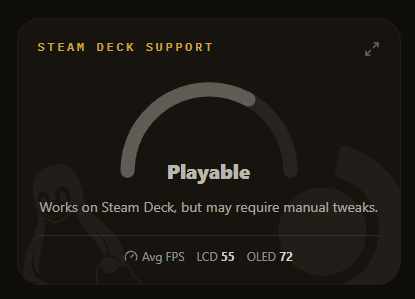
How to check the average FPS of a game on Steam Deck
- Search for the game. Type the game name into the search bar on the SteamScore home page and open its page.
- Find the Steam Deck support card. Scroll a little below the screenshots. Next to the game features you will see the Steam Deck support card with the Verified, Playable or Unsupported rating.
- Read the Avg FPS line. At the bottom of the card, the Avg FPS line shows the average frame rate players get on Steam Deck LCD and Steam Deck OLED. Hover a value to see how many samples it is based on and the period it covers.
If a game has no Avg FPS line, there is not enough Steam Deck data for it yet. That is normal for smaller or brand new games.
What the Steam Deck FPS numbers mean
The value is an average across all players and sessions on that Steam Deck model, not a single benchmark run. It already reflects the settings people really use, frame rate limits included. A few things are worth keeping in mind:
- LCD vs OLED. The Steam Deck LCD screen runs at up to 60 Hz and the OLED at up to 90 Hz, so games capped by the display often show a higher average on the OLED.
- Frame rate limits. Many players cap games at 30, 40 or 45 FPS to save battery. A lower average does not always mean the game cannot run faster.
- Combine it with the rating. Average FPS tells you how smooth a game is. The Verified, Playable or Unsupported rating on the same card tells you whether controls, text size and the launcher work well on the Deck.
Examples: check Steam Deck FPS for popular games
- Counter-Strike 2 Steam Deck FPS
- Dota 2 Steam Deck FPS
- Cyberpunk 2077 Steam Deck FPS
- Elden Ring Steam Deck FPS
- Stardew Valley Steam Deck FPS
Frequently asked questions
Where can I see the average FPS of a game on Steam Deck?
Open the game page on SteamScore and look at the Steam Deck support card. The Avg FPS line at the bottom shows the average frame rate for Steam Deck LCD and Steam Deck OLED.
Where does the Steam Deck FPS data come from?
The numbers are based on anonymous performance data Steam collects from Steam Deck players. SteamScore refreshes it regularly and shows the average for each Steam Deck model.
Why is the average FPS higher on Steam Deck OLED?
The Steam Deck OLED has a faster APU memory setup and a screen that refreshes at up to 90 Hz, while the LCD model tops out at 60 Hz. Games that are capped by the display can therefore run at higher frame rates on the OLED.
What is a good average FPS on Steam Deck?
Around 30 FPS is playable for slower games, 40 FPS feels noticeably smoother on the Deck, and 60 FPS or more is great for shooters and fast action games.
Why does a game have no FPS data?
Not every game has enough Steam Deck play sessions to calculate a reliable average. In that case SteamScore simply hides the Avg FPS line.